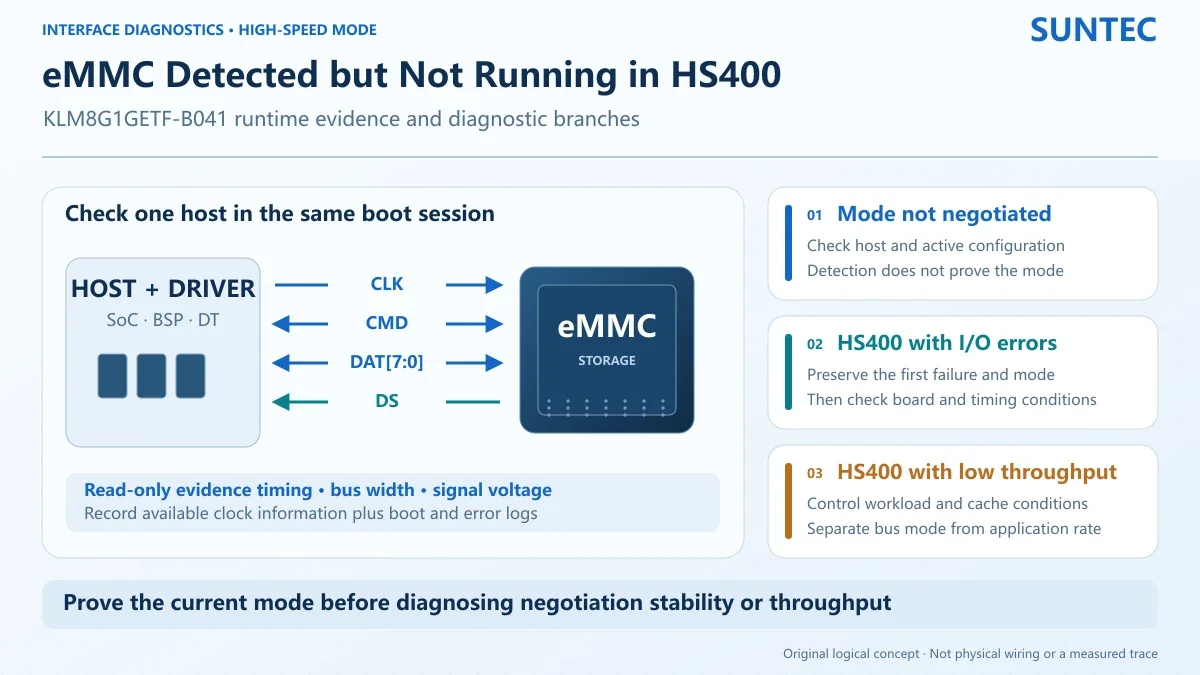
1. Capture the running configuration before changing it
Record the complete installed part number, board revision, SoC revision, kernel, and BSP build. Keep the identity of KLM8G1GETF-B041 with the record. Match the block device to its MMC host using the device path and enumeration log. Do not assume every board assigns the eMMC to mmc0.
Where debugfs is available and access is permitted, read the corresponding /sys/kernel/debug/mmcX/ios file. Linux v6.12 MMC debugfs code reports timing, width, signal voltage, and requested clock. It prints actual clock only when the host supplies that value. These are driver-reported settings, not voltage or clock measurements at the device. That distinction matters later.
| Evidence | Your record | Purpose |
|---|---|---|
| Device and boot | Part ____ host ____ boot/time ____ | Keep observations tied together |
| Software | Kernel ____ BSP ____ active DTB ____ | Identify the implementation being checked |
| Runtime interface | Timing ____ width ____ signal voltage ____ | Establish the host-reported configuration |
| Clock and errors | Clock ____ actual clock if exposed ____ first error ____ | Separate missing information from a valid reading |
| Observed workload | Read/write ____ size ____ queue ____ temperature ____ | Make later comparisons meaningful |
The blanks are a worksheet, not test results. If ios is absent, record that limitation and use the platform's supported runtime diagnostics. A missing debugfs file is not evidence that HS400 is unsupported.
2. Classify the reported mode and error state before tuning
Before attempting any eMMC HS400 tuning, classify the result into one working category. A low transfer rate cannot identify the bus mode. An HS400 status line alone does not establish stable operation.
| Observation | Working classification | Next evidence |
|---|---|---|
| HS200 or DDR52 is reported | HS400 is not the reported running mode | Host support, effective configuration, and transition log |
| HS400 or HS400 enhanced strobe is reported with I/O errors | High-speed operation has errors | First failed request, power, timing, and signal observations |
| HS400 is reported without I/O errors but throughput is low | Performance needs a controlled comparison | Workload, caching, completion criteria, and repeated results |
For an eMMC HS200 vs HS400 comparison, pair each measurement with the timing label for its host from that same boot. Keep HS400 enhanced strobe explicitly identified. Do not combine an earlier bootloader message with a later Linux benchmark and call them one operating state.
Once the branch is classified, use the matching section below. Keep each observation tied to its recorded mode and boot.
3. Branch A: if a lower mode is selected, check the supported path
Confirm the exact host port, silicon revision, and BSP support before editing the device tree. Then compare the running configuration with the hardware design. The Linux v6.12 MMC binding distinguishes bus width, voltage-specific HS400 support, and enhanced-strobe support. Adding an HS400 device-tree flag does not add missing wiring or supported voltage rails.
In Linux v6.12's standard HS400 selection path, entry requires an eight-bit bus. Check the device, host, board connection, and applicable I/O supply together. VCC and VCCQ are separate checks. Confirm the exact device's requirements rather than borrowing a family-page value.
A bounded example shows why versions matter. TI's AM62Px MMC guide states that SDK 11.1.1 supports HS400 on SR1.2, while earlier silicon revisions support up to HS200. That is an AM62Px example, not a Samsung device guarantee. Keep the relevant host documents with the Samsung KLM selection guide. We have not obtained a matching public Samsung SKU datasheet that establishes every condition for this installed part.
4. Branch B: if HS400 has eMMC HS400 I/O errors, preserve the failing transition or request
Save the initialization and first failing-request logs before changing delays. Identify whether failure starts during mode entry or only under load. Record power conditions and the point where errors first appear. A successful enumeration does not establish margin under the failing condition.
Review CLK, data-strobe, data routing, and VCCQ against the host and device design requirements. TI SPRADP5A addresses AM62Px board design and simulation. Its routing and delay examples belong to that platform. They are not universal HS400 tuning values for a KLM8G1GETF-B041 board.
Use the tuning procedure supported by the actual driver. Standard HS400 and enhanced-strobe initialization have distinct paths in Linux v6.12. A controlled lower-mode comparison can narrow the investigation, but an improvement alone does not establish the root cause.
5. Branch C: if HS400 has no reported errors, compare eMMC HS400 low throughput fairly
Hold the read/write pattern, transfer size, queue depth, data set, cache policy, temperature, and completion criterion constant. Use an approved test area and preserve production data. Report what completed and whether errors appeared. Do not compare a cached read with a storage write and attribute the difference to HS400.
Record the mode before and after the workload. Keep bus-mode evidence separate from end-to-end throughput. If endurance or temperature qualification also needs review, use the separate eMMC health and temperature guide. Those checks cannot establish the negotiated mode.
Close with the observed branch, evidence, one justified change, and the repeat-test result. State unresolved device or board conditions. This workflow reports no KLM8G1GETF-B041 board test and promises no throughput figure.
Working through an eMMC HS400 bring-up?
Keep the full KLM8G1GETF-B041 code, host and BSP versions, runtime record, and failed workload with the project requirement. Compare candidate devices against the same interface conditions and the original documentation for each exact ordering code. For a SUNTEC quotation, provide the quantity and any unresolved HS400 or board-validation requirements.